
Feedback templates (like performance reviews or 360° feedback forms) can be mapped to employees based on their Work Role. Different work roles have different responsibilities and competencies.
During a performance cycle, it will automatically assign the mapped template to employees in that work role.
This ensures feedback is role-specific, relevant, and standardized.
To map the template based on Work role, the mapping logic is to be checked in the Growth settings page .
Navigate to Admin -> Tenant Admin -> Manage Growth Settings
Click on ADD and Choose the plan type and select company and enable the Work role button
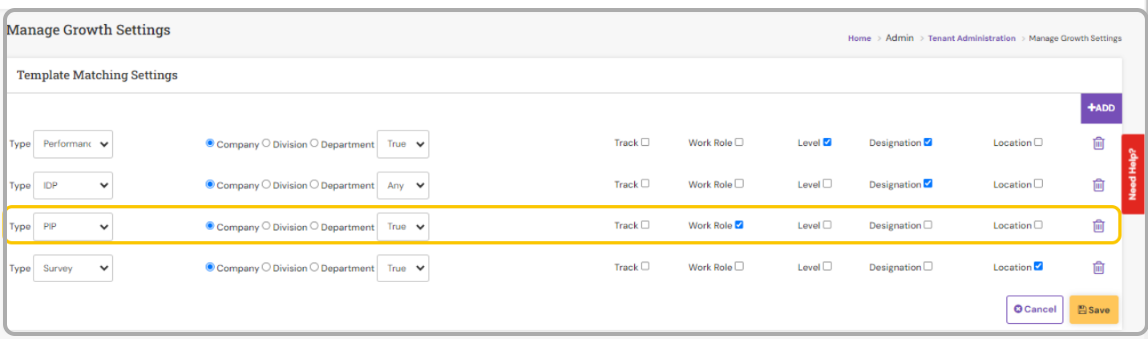
Finally, click on Save.
Once the mapping logic is set, make sure the Work role field is filled in the employee profile so that the template can be mapped.
To create the template follow the below pathway,
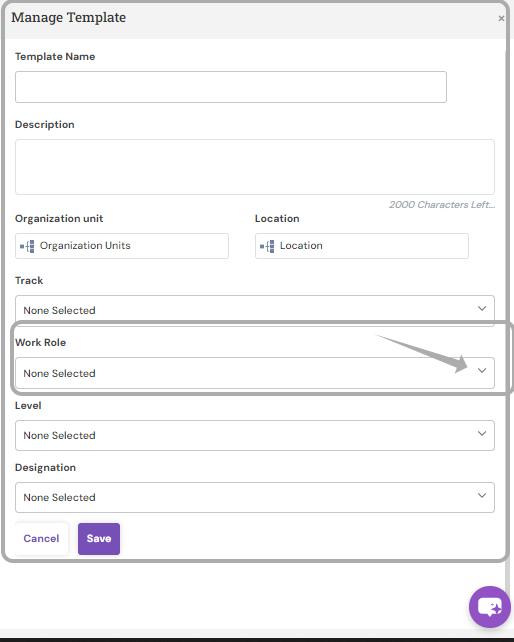
Admin->HR Admin -> Manage Feedback Template -> click on ADD
Enter all the essential information, name of the template description if any, choose the Work role, finally click on Save.
Once the template is created open the respective template and add all the attributes and respective review group & grade scale and click on save and publish the same.
PS: Synergita implementation for your Organization may vary from how the features are described here. The screenshots given here may also be different from what you see in your system. Please talk to the concerned person in the Organization for any specific queries.